Authorisation
User-restricted endpoints
User-restricted endpoints give access to secure, personal data. To use them, your application must get permission from the end user.
How authorisation works
We use the open standard OAuth 2.0 with the Authorization Code Grant. This standard lets you give your application permission to interact with us without sharing your password.
We also support PKCE, but you do not have to use it.
How you sign in
- Sign in with your HMRC account.
- Choose which scopes your application can access. We issue an OAuth 2.0 access token
- Your application sends this token when calling any user-restricted endpoint.
Types of HMRC accounts
HMRC has different sign-in accounts for:
- Individuals
- Organisations
- Agents
Access works as follows:
- Individuals and organisations can only access their own data.
- Agents can access their clients’ data.
Each API lists the scopes and rules it requires in the API documentation.
Token lifespan
- An access token lasts 4 hours.
- When it expires, you can get a new one using a single-use refresh token.
- After 18 months, refresh tokens stop working. At this point, you must go through the authorisation process again.
Getting an OAuth 2.0 access token
The authorisation user journey is an important part of our security and may be changed without notice.
1. Request authorisation
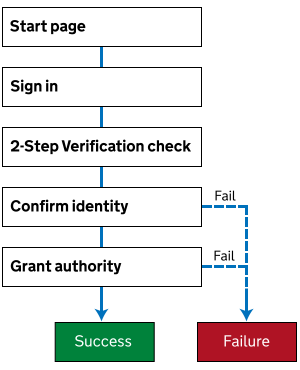
We display a start page that explains the authorisation process.
- Send your user to our authorisation endpoint in-page link.
- The user is taken through 2-Step Verification (2SV).
- You may be asked to confirm your identity. This depends on the user type; the specific API scopes being requested and whether you have previously confirmed your identity.
- You’re asked to grant your application the authority to access certain scopes.
The following diagram illustrates the process:
Syntax
curl -X GET "https://test-www.tax.service.gov.uk/oauth/authorize?\
response_type=code\
&client_id=[YOUR-CLIENT-ID]\
&scope=[REQUESTED-SCOPE]\
&state=[STATE]\
&redirect_uri=[YOUR-REDIRECT-URI]\
&code_challenge=[CODE-CHALLENGE]\
&code_challenge_method=[CODE-CHALLENGE-METHOD]"
Example
curl -X GET "https://test-www.tax.service.gov.uk/oauth/authorize?\
response_type=code\
&client_id=Hf8sfkiUkYp9I3_R10qSnZ2ZUvoa\
&scope=scope_1+scope_2+scope_3\
&state=30de877c-ee2f-15db-8314-0800200c9a66\
&redirect_uri=https://www.example.com/auth-redirect\
&code_challenge=E9Melhoa2OwvFrEMTJguCHaoeK1t8URWbuGJSstw-cM\
&code_challenge_method=S256"
| Parameter | Description |
|---|---|
response_type |
The OAuth 2.0 response type. Currently the only acceptable value is code. |
client_id |
The Client ID for your application. |
scope |
A space-delimited list of scopes you would like to have permission to access on behalf of your user. Must be URL-encoded, so spaces must be represented as either %20 or +. |
state (optional) |
An opaque value used to maintain state between the request and callback and to prevent tampering as described in the OAuth 2.0 specification. This is passed back to your application via the redirect_uri. |
redirect_uri |
The URI that we use to send users back to your application after successful (or unsuccessful) authorisation. This must match one of the redirect URIs you specified when you created your application. For more details see our reference guide. |
code_challenge (optional) |
The PKCE code_challenge is used to ensure that the subsequently-issued access token is not intercepted. This is mandatory if code_challenge_method is provided. |
code_challenge_method (optional) |
The PKCE code_challenge_method is used to transform the code_verifier to the code_challenge. This must have a value of S256. This is mandatory if code_challenge is provided. |
Error scenarios
If there are any issues with your call to our authorisation endpoint, we return an HTTP error status to your user’s browser.
Any errors not listed are probably not from us. One possible cause is a network access issue.
| Error scenario | HTTP status | Error code | Error message |
|---|---|---|---|
| Client ID is missing | 400 (Bad Request) |
invalid_request |
client_id is required |
| Client ID is invalid | 400 (Bad Request) |
invalid_request |
client_id is invalid |
| Redirect URI is missing | 400 (Bad Request) |
invalid_request |
redirect_uri is required |
| Redirect URI is invalid | 400 (Bad Request) |
invalid_request |
redirect_uri is invalid |
| Response Type is missing | 400 (Bad Request) |
invalid_request |
response_type is required |
| Response Type is invalid | 400 (Bad Request) |
unsupported_response_type |
response_type must be 'code' |
| Scope is missing | 400 (Bad Request) |
invalid_request |
scope is required |
| Scope is invalid | 400 (Bad Request) |
invalid_scope |
scope is invalid |
| Client secret was included in the request | 400 (Bad Request) |
invalid_request |
client_secret should NOT be present |
| PKCE Code Challenge cannot be empty | 400 (Bad Request) |
invalid_request |
code_challenge if present, cannot be empty |
| PKCE Code Challenge Method, must be S256 | 400 (Bad Request) |
invalid_request |
code_challenge_method, if present, must be S256 |
| PKCE Code Challenge Method should be present when Code Challenge is present | 400 (Bad Request) |
invalid_request |
code_challenge_method should be present when code_challenge is present |
| PKCE Code Challenge should be present when Code Challenge Method is present | 400 (Bad Request) |
invalid_request |
code_challenge should be present when code_challenge_method is present |
| Unexpected error occurred | 500 (Internal Server Error) |
server_error |
Various |
Browser support
For details of which browsers we support for the authorisation journey see OAuth 2.0 browser support, especially if you use an embedded browser.
2. Receive authorisation results
You must create an endpoint in your application to receive the authorisation results. This endpoint must accept an HTTP GET request to the redirect URI you specified in step 1.
Your browser will be redirected back to your endpoint once you’ve granted your application the requested authority.
Your endpoint must support the following query parameters:
| Parameter | Description |
|---|---|
code |
The authorisation code, if authorisation is successful. This is a single-use token that will expire after 10 minutes. |
state |
The value of the state parameter you provided in the authorisation request, whether authorisation is successful or not. |
error |
Always access_denied, if authorisation failed. |
error_description |
Human readable description of the error, if authorisation failed, for example, “user denied the authorization”. |
error_code |
Error code, if authorisation failed, for example, USER_DENIED_AUTHORIZATION.The full list of error codes can change over time, so we recommend you do not cater for specific error codes. |
Example of a redirect we issue after a successful authorisation:
https://www.example.com/auth-redirect?code=6589c5d9fc4b9872b1f9013583c2f39d&state=30de877c-ee2f-15db-8314-0800200c9a66"
Example of a redirect we issue after an unsuccessful authorisation:
https://www.example.com/auth-redirect?error=access_denied&error_description=user+denied+the+authorization&error_code=USER_DENIED_AUTHORIZATION&state=30de877c-ee2f-15db-8314-0800200c9a66
3. Exchange authorisation code for access token
When you receive the authorisation code, you must exchange this for an access token within 10 minutes.
Do this via a POST to our token endpoint.
Example request
curl -X POST -H "content-type:application/x-www-form-urlencoded" --data \
"client_secret=[YOUR-CLIENT-SECRET]\
&client_id=[YOUR-CLIENT-ID]\
&grant_type=authorization_code\
&redirect_uri=[YOUR-REDIRECT-URI]\
&code=[AUTHORIZATION-CODE]" \
&code_verifier=[CODE-VERIFIER]" \
https://test-api.service.hmrc.gov.uk/oauth/token
| Parameter | Description |
|---|---|
client_secret |
One of the client secrets for your application. |
client_id |
The Client ID for your application. |
grant_type |
The OAuth 2.0 grant type. Currently the only acceptable value is authorization_code |
redirect_uri |
The same redirect URI you used to call the authorisation endpoint. For more details see our reference guide. |
code |
The authorisation code you received from us in the previous step. |
code_verifier (optional) |
The PKCE code_verifier is mandatory if code_challenge was provided in the call to /authorize. |
The response contains the access token used for calling the APIs and a refresh token used to obtain a new access token once the current one expires.
Example response
{
  "access_token": "QGbWG8KckncuwwD4uYXgWxF4HQvuPmrmUqKgkpQP",
  "token_type": "bearer",
  "expires_in": 14400,
  "refresh_token": "unJkSs5cvs8CS9E4DLvTkNhcRBq9BwUPm23cr3pF",
  "scope": "read:employment"
}
Error scenarios
If something goes wrong with your request to the token endpoint, we return an HTTP error.
Errors not listed here are usually caused by something outside of our control. One possible cause is a network access issue, for example your network might allow GET requests but not POST requests.
| Error scenario | HTTP status | Error code | Error message |
|---|---|---|---|
| Client ID is missing | 400 (Bad Request) |
invalid_request |
client_id is required |
| Client ID is invalid | 401 (Unauthorized) |
invalid_client |
invalid client id or secret |
| Client Secret is missing | 400 (Bad Request) |
invalid_request |
client_secret is required |
| Client Secret is invalid | 401 (Unauthorized) |
invalid_client |
invalid client id or secret |
| Grant Type is missing | 400 (Bad Request) |
invalid_request |
grant_type is required |
| Grant Type is invalid | 400 (Bad Request) |
invalid_request |
unsupported grant_type |
| Redirect URI is missing | 400 (Bad Request) |
invalid_request |
redirect_uri is required |
| Redirect URI is invalid | 400 (Bad Request) |
invalid_request |
redirect_uri is invalid |
| Code is missing (for example because authorisation failed in step 2) | 400 (Bad Request) |
invalid_request |
code is required for given grant_type |
| Code is invalid | 400 (Bad Request) |
invalid_request |
code is invalid |
| PKCE Code Verifier wasn't expected as no Code Challenge was provided when requesting an authorization code | 400 (Bad Request) |
invalid_request |
code_verifier is not expected |
| PKCE Code Verifier was expected but none was supplied | 400 (Bad Request) |
invalid_request |
code_verifier is expected when code_challenge was supplied |
| PKCE Code Verifier is made up of fewer than 43, more than 128, or invalid characters | 400 (Bad Request) |
invalid_request |
code_verifier must contain valid characters of length between 43 and 128 |
| PKCE Code Verifier does not correlate to Code Challenge | 400 (Bad Request) |
invalid_grant |
code_verifier is invalid |
| Unexpected error occurred | 500 (Internal Server Error) |
server_error |
Various |
4. Call an API
You can now call an API using the access_token we issued. Do this with an Authorization header containing this access_token as an OAuth 2.0 Bearer Token with the correct API scope.
Example request
curl -X GET https://test-api.service.hmrc.gov.uk/hello/user \
-H "Accept: application/vnd.hmrc.1.0+json" \
-H "Authorization: Bearer [ACCESS-TOKEN]"
5. Refreshing an access token
Your access token expires after 4 hours.
When the access_token has expired, any API call from your application will return HTTP 401 (Unauthorized) and an error code of INVALID_CREDENTIALS.
To refresh the access_token, submit the expired token’s corresponding refresh_token to our token endpoint using grant_type of refresh_token.
You can only use a refresh_token once. When you refresh an access_token, it invalidates the original access_token immediately if it has not already expired.
If your application makes several API calls at the same time, take care to avoid race conditions when refreshing tokens.
Example request
curl -X POST -H "content-type: application/x-www-form-urlencoded" --data \
"client_secret=[YOUR-CLIENT-SECRET]\
&client_id=[YOUR-CLIENT-ID]\
&grant_type=refresh_token\
&refresh_token=[REFRESH-TOKEN]" \
https://test-api.service.hmrc.gov.uk/oauth/token
Example response
{
  "access_token": "unJkSs5cvs8CS9E4DLvTkNhcRBq9BwUPm23cr3pF",
  "token_type": "bearer",
  "expires_in": 14400,
  "refresh_token": "jPtmQuLtKmLhGURk8CmR2sWPmffBhDhPyFEEF4ay"
}
Error scenarios
If there are any issues with your call to our token endpoint, we return an HTTP error status.
Errors not listed are probably not from us. One possible cause is a network access issue.
| Error scenario | HTTP status | Error code |
|---|---|---|
| Client ID is missing | 400 (Bad Request) |
invalid_request |
| Client ID is invalid | 401 (Unauthorized) |
invalid_client |
| Client Secret is missing | 400 (Bad Request) |
invalid_request |
| Client Secret is invalid | 401 (Unauthorized) |
invalid_client |
| Grant Type is missing | 400 (Bad Request) |
invalid_request |
| Grant Type is invalid | 400 (Bad Request) |
invalid_request |
| Refresh Token is missing | 400 (Bad Request) |
invalid_request |
| Refresh Token is invalid | 400 (Bad Request) |
invalid_grant |
| Refresh operation is already in progress | 400 (Bad Request) |
invalid_request |
| Unexpected error occurred | 500 (Internal Server Error) |
server_error |
Requesting a new token
Unless you revoke access or the token is tampered with, the authorisation you grant lasts for 18 months. After that, you can no longer refresh your access token.
If the refresh_token has expired, any call from your application to the token endpoint will return a HTTP 400 (Bad Request) and an error code of invalid_grant.
When this happens, your application must send the user back through the full process for Getting an OAuth 2.0 access token in-page link.
Revoking authority
You can revoke the authority granted to your application at any time using the Manage authorised applications online service.
Agents with multiple accounts
Some agent organisations have more than one set of HMRC sign in details, and their client relationships are spread across those accounts. There are a few ways to handle this:
- If the accounts belong to the same organisation, the agent can manage client relationships themselves using the HMRC online service.
- If the accounts belong to different organisations (for example due to a merger), in some cases the agent can ask us to merge their accounts.
- Your application may hold multiple OAuth 2.0 access tokens for the agent, but you must take care to use the correct token for each client when calling our APIs. Using the wrong access token results in an HTTP status code of 401 (Unauthorized).
OAuth 2.0 for installed applications
Our OAuth 2.0 implementation supports applications that are installed on a user's device, as long as it can access the system browser or an embedded browser.
The Redirect URI determines how the authorization_code is returned to your application.
If your application runs on a remote web server, the redirect URI sends the authorization_code back to that server, allowing you to manage authorisation tokens centrally.
For distributed applications installed on your device, and where no central web server exists, you have the following options for a redirect URI:
http://localhost:[PORT]
The authorization_code is returned to a web server running on the client at the specified port.
This may not always be suitable, for example where a firewall stops your client from listening on a HTTP port.
We recommend this approach for any installed application that's supported by the client configuration.
urn:ietf:wg:oauth:2.0:oob
The authorization_code is shown in the title of an HTML page. Your application can parse the DOM to retrieve the code and then close the window before the user sees the rendered web page.
If your application can't parse the DOM or close the window, the HTML page renders the authorization_code along with a message asking the user to copy the code and paste it into your application, before closing the window.
urn:ietf:wg:oauth:2.0:oob:auto
The authorisation code is shown in the title of an HTML page, and the user sees a message asking them to close the browser window.
Use this option if your application can detect when the page has loaded and can parse the DOM to read the code from the title, but can't close the window itself.