There are many opportunities for AI assistants (such as Copilot, Gemini and Claude) to add value to your work. For example, you can streamline evidence gathering, support analysis or enhance your review processes.
AI cannot replace your professional judgement or responsibility. Use it to support your work, not make decisions.
For detailed guidance, frameworks and practical examples, learn how to experiment with prompts.
When to use AI
AI will not help with every task. Use your expertise and judgement to decide when and how to use it.
✅ AI is good at:
- summarising long documents
- finding common themes across multiple documents
- suggesting improvements to drafts you've written
- restructuring or reformatting existing content
- generating initial ideas or options to consider
❌ AI struggles with:
- tasks that need high accuracy
- understanding your specific context or organisational priorities
- making decisions that need professional judgement
- providing current information unless you give it the latest sources
AI will not always behave as you expect. It might help you with a complex task but struggle with something simpler (this inconsistency is known as the ‘jagged frontier’). Do not assume AI can handle a task because it did well on something else. Test it with known examples to find out what it can and cannot do.
How AI should support your work
AI can support your work in two ways:
- support and enhance your work while you stay in control (augmentation)
- complete tasks independently while you review output (automation)
Augmentation is the most common and valuable use of AI for professional work. You keep control and apply your judgement, while AI improves specific parts of your process. Use this when tasks need your judgement, creativity or context. For example:
- stress-testing your ideas by asking AI to challenge your thinking
- getting suggestions to improve a draft you've written
- exploring different approaches to a problem
Automation helps you complete common, repetitive tasks. Use this for well-defined tasks with clear rules. You still need to check the outputs. For example:
- extracting specific data from documents
- formatting content to meet requirements
- creating first drafts from standard templates
Choose the right AI tool
The best tool choice depends on how frequently you'll do the task and how accurate the results need to be.

For example, for tasks which are:
- low frequency, lower accuracy - use general AI tools (Copilot, Gemini and Claude) for tasks like generating ideas
- low frequency, high accuracy - use AI with human oversight for tasks like critical policy submissions
- high frequency, acceptable variation - use customised AI tools (agents) for tasks like regular correspondence
- high frequency, high accuracy - use specialised AI tools for tasks like compliance checks
Identify how AI can help with your work
Identifying where AI can help is not always obvious. Think of AI as a team member you can delegate specific tasks to - but not everything.
Start by breaking down your work into steps helps you see where AI might support you. For example, you can break down your:
workflows - the broader things you deliver
tasks - actions with clear outputs
steps - individual actions needed to complete a task
Example: developing a policy proposal
You need to identify how AI might be able to help you develop a policy proposal.
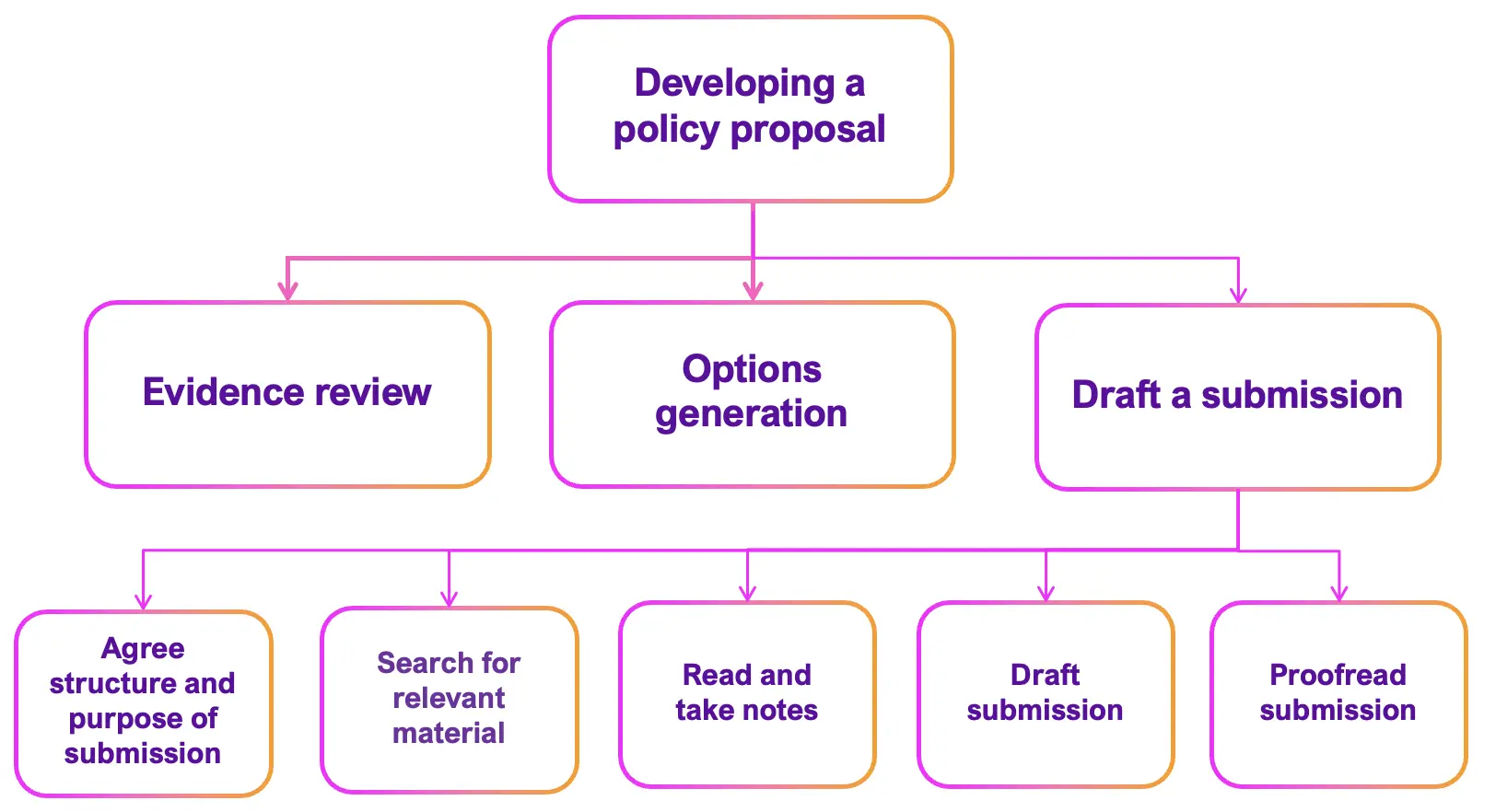
First, identify the main tasks, such as:
- conduct an evidence review
- generate policy options
- draft a submission
Then, split each task into steps. For example, the task 'draft a submission' involves:
- agreeing structure and purpose of the submission
- searching for relevant material
- reading and taking notes
- drafting the submission
- proofreading the submission
AI is not suitable for all of these steps, for example, agreeing structure and purpose involves human judgement.
Understand what roles AI can do
Once you identify what AI can support you with, you need to consider the role it can take, for example: :
- brainstorming - generating ideas and exploring different perspectives
- planning - defining project scope and planning step by step
- searching - finding relevant sources from the internet or databases
- extracting - selecting and copying key information from sources
- analysing - examining and interpreting information
- summarising - condensing information into concise points
- drafting - writing an output
- quality reviewing - evaluating and refining output
Some steps benefit from AI support while others need your expertise. Even when AI helps with tasks like drafting, your judgement is essential.
Example: identify roles AI could take for each step
Looking at the 'draft a submission' steps:
- agree structure and purpose of submission (AI not suitable)
- searching for relevant material (AI can support by searching)
- reading and taking notes (AI can extract and summarise information)
- drafting the document (AI can support iterative draft development with human review)
- proofreading (AI can support quality review by checking for spelling and grammatical errors)

Verify your AI outputs
AI can make mistakes, for example:
- invent (hallucinate) facts, statistics for references
- reflect or amplify bias in its training data
- miss recent events, changes or policies (unless you give it current sources)
You are responsible for checking outputs before you use them. The level of checking you need depends on the risk in your context, for example:
low-stakes tasks, such an email to a teammate, may only need a quick sense check
a high-stakes tasks, such an email to stakeholder, may need a more thorough verification
How to check outputs
Use your domain expertise and judgement to check if the output makes sense for your specific situation. You might need to:
- sense check - does this align with your knowledge and experience? Does the logic make sense?
- source check - verify (cross-reference) any cited sources, references, or legislation
- check the numbers - verify statistics, dates, and figures against original sources or datasets
- check with experts - ask colleagues or subject matter experts to review important or public-facing content
Make verification easier
To make it easier to check the AI's output's are correct, you should:
- give it specific, reliable source material to work from
- ask it to provide sources for its answers
- make sure allocate sufficient time to check outputs
AI can create fake sources or misquote real ones. Always check that sources exist and say what the AI claims.
Using AI in government
Always follow the Civil Service code and use AI with integrity, honesty and objectivity. Check outputs carefully and protect sensitive information
Think about what information you can safely share with AI tool you’re using. For example, paid versions of tools (such as, Copilot Enterprise, or Gemini Pro) have data protection agreements. This means they can often handle personal and sensitive information safely.
Check your department's guidance to understand what each tool can handle. If you're unsure, ask your line manager or information governance team
Good AI use needs a culture of both experimentation and responsibility. Try new approaches, but also challenge outputs, raise concerns and question whether AI is the right tool for each task.
Review and approve AI content
If you use AI to create or change official content, you must:
- review the content for correctness and quality
- make sure it meets required standards before publishing or sharing
You're responsible for AI-generated content as if you created it yourself.
This applies to official documents, reports, presentations, web content, and published material. You don't need to state you've used AI use for routine internal correspondence, but you should still review anything AI creates or edits.
AI content and Freedom of Information
AI-generated content can be requested under the Freedom of Information Act. This includes your prompts and AI's responses, materials created or edited with AI, and meeting content that's been transcribed or summarised.
If using AI in group meetings, ask for consent from participants before using AI to transcribe, summarise, or process the discussion.
What to do next
Find out more about:
- experimenting with prompts
- examples of prompts you can use
- the AI Policy toolkit which helps policy professionals make better use of AI tools (currently in beta testing with DBT and DSIT)
Using AI at work